Introduction
Claude Code’s skill mechanism seems to save tokens but hides some complexities. After installing 8 skills, one user saw a 30% increase in their API bill, which returned to normal after uninstalling all but 2. This reveals three major pitfalls: persistent skill descriptions, accidental triggers, and confusion with MCP.

A friend of mine, who works in backend development, got excited about Claude Code and installed 8 skills at once. He thought he was well-equipped with skills for code generation, database migration, writing tests, creating architecture diagrams, explaining errors, and checking API documentation. He claimed this would save him both time and tokens, as the official documentation suggested a 98% token saving with gradual disclosure.
A month later, he reported a significant increase in his API bill. After some reflection, he uninstalled all but 2 skills, and his bill returned to normal.
This situation reminded me of when people overload their Chrome with extensions; they think they are gaining efficiency, but the browser slows down, and it’s only when they remove the extensions that they realize the problem was with their choices.
For my friend, who used the API rather than a subscription, each token represented real money. Pro users might not feel this as acutely, but the underlying mechanism is the same. This article will clarify how skills save tokens differently than expected. While the official documentation highlights the benefits, many users express confusion in the issue forums about why they aren’t saving tokens. The discrepancy isn’t due to a flaw in the skill mechanism; it’s because users misunderstand a few key points.
What Exactly is a Skill? How Does it Differ from Your Daily Prompts?
To understand whether skills save tokens, we first need to clarify what skills are. Many people mistakenly view skills as an enhanced version of prompts, which is a significant misunderstanding.
You use prompts daily. When a question arises, you type out a detailed message containing background, requirements, format, and examples, and send it to the model. The model reads it and responds. Once that’s done, a new question arises, and you must repeat the process or copy and modify the previous prompt.
Prompts are consumables. Each time you ask a question, it consumes tokens.
Skills, on the other hand, are a way to package a set of knowledge, processes, and standards in advance. They have a name, a description, and a body of content. Typically, they remain inactive until a question arises that falls under their jurisdiction, at which point the model retrieves the relevant content.
For example, prompts are like clothes you must put on every time you leave the house—sometimes dirty or wet, requiring you to rummage through your wardrobe each time. Skills are like a well-organized suit hanging in your closet—when you need it for a formal occasion, you just put it on and go.
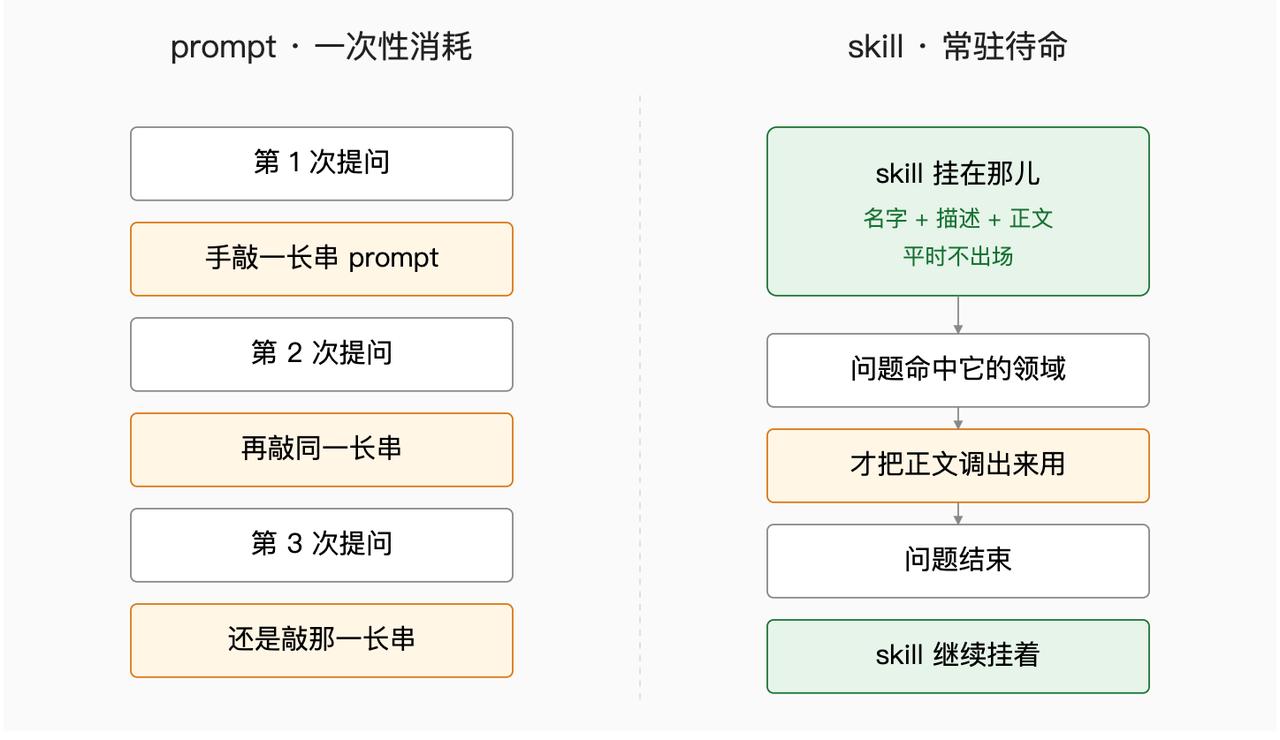
The difference may seem minor, but the calculations show a significant disparity.
Prompts have explicit consumption. The length of your input directly correlates to the number of tokens consumed. It’s straightforward: longer prompts consume more tokens, and shorter ones consume fewer.
Skills have implicit consumption. The body of a skill is indeed loaded on demand—you don’t incur costs if you don’t invoke it. However, the description is always present. Each time you send a question, the model must review all the skill descriptions to decide whom to summon.
This is why skills save tokens differently than prompts. Prompts save tokens by being shorter, while skills save tokens by being relevant. If you have the right skills, the body loads as needed, which is clear savings. If you have the wrong skills, the descriptions persistently consume tokens and may even trigger the body unnecessarily, leading to wasted resources.
Thus, those who treat skills as “enhanced prompts” are already off on the wrong foot. They think that more skills mean more capabilities, but in reality, skills are like a closet—too many skills can lead to clutter, making it harder to find what you need.
In summary, skills and prompts are fundamentally different. Misunderstanding this leads to confusion in later discussions.
Gradual Disclosure: What is Saved and What is Not?
The official documentation presents the concept of gradual disclosure as a way skills save tokens. It sounds academic but is quite simple—things are revealed as needed and not before.
Imagine a time before skills when you needed to write a Python test while adhering to a specific team standard—say, using pytest, having fixtures, mocking the database, and covering edge cases. This could amount to several thousand words. Before skills, you would have to include this entire set of standards in your prompt every time, consuming tens of thousands of tokens daily.
With skills, you can package these standards into one skill. Next time you ask, “Help me write a test,” the model recognizes that this falls under the “Python Testing Standards” skill and loads the relevant content.
Where’s the savings? It’s in the 99 times you didn’t ask about it, where those several thousand words didn’t consume a single token.
This mechanism is real. The official documentation is not misleading.
However, what the documentation doesn’t emphasize is that descriptions are always present.
Each skill requires a description that informs the model, “This is what I do, and under what circumstances I should be summoned.” While these descriptions are short—ranging from dozens to a couple of hundred tokens—they are present in every conversation. If you install one skill, a description is always in the context. If you install five, five descriptions are present. If you install twenty, twenty descriptions are there.
This leads to what I call the “long bill.”
In a single conversation, the cost of these descriptions may seem negligible compared to the thousands of tokens consumed by a full skill body. However, if you install many skills and use them frequently, the costs accumulate.
Assuming each skill description averages 80 tokens, if you have 20 skills, that’s 1600 tokens constantly present in your conversation context. If you interact with Claude 50 times a day, that’s 80,000 tokens consumed just for having those skills on standby—when perhaps only 5 of them are actually used.
The remaining 15 skills are just sitting there, collecting their “registration fees.”
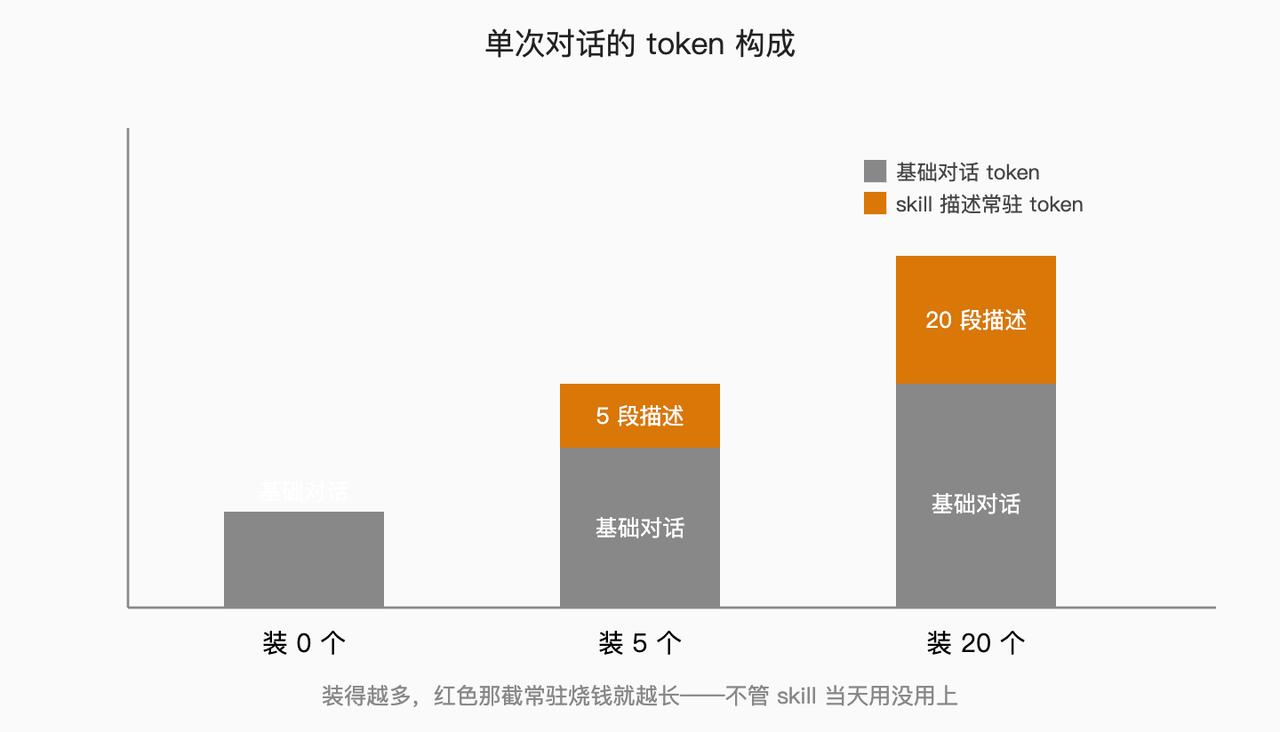
So, gradual disclosure saves variable costs—the skill body loads as needed, and unused skills don’t consume tokens. However, it doesn’t save fixed costs—the descriptions are a constant expense, and the more you install, the more you incur.
While this can lead to savings in the long run, the key is that the skills you install must be genuinely useful. If you install a bunch just in case, and none are used for two months, then those skill descriptions are purely wasted costs with no benefit.
This explains the increase in my friend’s bill. Half of the 8 skills he installed were likely “cool” but not useful—skills for creating architecture diagrams, drawing ER diagrams, or generating unit test coverage reports, which he didn’t use even once in a month. Yet their descriptions were always present in his context.
So yes, skills can save tokens, but only on the parts you actually use. If you install too many, you may not save as much as expected and could end up spending more. But that’s not the most outrageous part.
Poor Descriptions Cost More Than Not Installing—Accidental Triggers are an Invisible Tax
While persistent descriptions quietly incur costs, there’s a more aggressive way to burn tokens—accidental triggers.
The principle behind accidental triggers is simple: if your skill description is vague, the model can’t determine when to summon it. If a question doesn’t belong to its domain, the model might hesitate and summon it anyway. This summoning isn’t just for the description; it brings the entire skill body—potentially thousands of tokens—into the context.
For instance, you might ask, “What’s the weather like today?” and inadvertently trigger a skill meant for writing tests. If that skill has a 5000-word body explaining how to use pytest, fixtures, and mocks, it has nothing to do with the weather, but those tokens have already been consumed.
This is the invisible tax. You pay without even realizing it.
What does a poor description look like? I can list several from memory, but the most common types are:
-
Overly Broad Descriptions: For example, a skill called “Code Assistant” with a description stating, “Helps with various code-related issues.” This is essentially useless—what counts as code-related? You could ask about function optimization, database selection, or Linux commands, and it would trigger each time, even if irrelevant.
-
Keyword Stuffing: Some people write skill descriptions like SEO titles, cramming in every related term: “Python, JavaScript, Go, Rust, TypeScript, code generation, code review, performance optimization, bug fixing, architecture design…” The more terms you include, the less clear the focus becomes. As a result, if any keyword matches, the skill gets triggered.
-
Ambiguous Intent: A good description should specify when to summon the skill, such as “summon me when users ask X but not in situation Y.” However, most descriptions only cover the first part, omitting the boundaries. Without clear limits, the model has no choice but to err on the side of caution and trigger the skill.
These types of poor descriptions lead to a scenario where you have multiple skills with unclear boundaries, each vying to be triggered in every conversation. Not only do they fail to solve problems, but they also burn thousands of tokens unnecessarily each time.
My friend’s bill increased by 30%, largely due to three skills with poorly written descriptions—“help you write better code,” “provide professional advice,” and “solve your development challenges.” These descriptions are worse than having no description at all, as they leave the model unable to determine boundaries. As a result, these skills were triggered almost every conversation, consuming thousands of tokens without providing any value.
Poorly written skill descriptions don’t just fail to save money; they can cost more than not having the skills installed at all. Without them, you might only face longer prompts—what you write is what you consume, clearly. With poor descriptions, you risk having unrelated skill bodies inserted into the conversation without knowing what you’re paying for.
This may sound abstract, but there’s a simple self-check method: spend a day chatting with Claude and ask each time a skill is summoned, “Was it necessary to summon this skill?” After a week, you’ll have a clear idea of which skills are frequently triggered—those are the ones with problematic descriptions that need rewriting or uninstalling.
However, most people won’t do this. They install skills and leave it at that, never reviewing. This leads to many complaints about skills not saving tokens—not because they don’t, but because users have installed skills that act like thieves, wondering why their wallets are getting thinner.
Comparing Skills to MCP: Understanding Where Skills Save Tokens
At this point, it’s important to clarify the difference between skills and MCP, as many users mix them up, leading to doubled costs without understanding why.
Let’s break these two down.
MCP (Model Call Protocol) is a tool invocation protocol. It addresses the issue of actions the model itself can’t perform, such as checking the weather, reading files, querying databases, or making requests. Installing an MCP is like handing the model a hammer. When it needs to hammer something, it picks up the hammer and uses it.
Skills, however, are a knowledge loading mechanism. They address the issue of specialized knowledge or processes the model doesn’t inherently possess, such as your team’s coding standards, a project’s architecture diagram, or a glossary of industry terms. Installing a skill is like giving the model a manual for your company. When it needs to reference something, it pulls it out.
MCP is a tool; skills are manuals. They serve different purposes—one enables the model to perform actions, while the other informs the model about information.
The logic behind token consumption is also different.
MCP saves action tokens—previously, the model would have to use a long description to say, “I need to check the weather, how do I do that? First, I’ll curl this API, then parse the returned JSON…” With MCP, it can directly call a function, saving tokens on that verbose description.
Skills save context tokens—previously, you’d have to include team standards in every prompt, with thousands of words constantly present. With skills, those words stay dormant until needed, saving you from repeating lengthy documents.
These two save different segments of tokens.
So what does it mean to mix them and double your costs?
I’ve seen a typical misuse where someone treats an MCP like a skill. For example, they might create an MCP that contains a large chunk of team standards, causing Claude to load those standards every time it calls the MCP. On the surface, this seems clever—MCPs are called on demand, so they aren’t in the context all the time. However, calling an MCP loads the entire content into the context. This is essentially forcing a knowledge loading problem that should be solved with a skill into an MCP shell. Each call loads thousands of words of standards, while a skill could load only the relevant sections.
Conversely, some treat skills like MCPs. For instance, a skill called “Call Internal API” might contain various API URLs, parameters, and examples. When Claude calls this skill, it loads the entire body—what good does that do? It still can’t actually call the API; it lacks the tools. This should have been addressed with an MCP—providing a function that can actually send requests. Instead, you’ve given it a pile of useless documentation, which consumes tokens each time it loads.
Using them incorrectly means you’re spending double the tokens for half the work.
The correct approach is to separate actions and knowledge: actions belong to MCPs, while knowledge belongs to skills. If you want Claude to perform a task, write an MCP. If you want Claude to understand something, write a skill. Using these two in tandem ensures no overlap.
In short, don’t mix them. If you do, you’re the one who pays the price.
The Real Token Consumers are Users, Not Skills
The technical mechanism is neutral; user habits are what drive costs.
The skill mechanism itself is straightforward—it’s a layer for on-demand loading. It doesn’t actively consume your money; all its actions are passive responses to how you configure, describe, and manage it.
The same skill can lead to vastly different bills for different users.
One user might think carefully before installing a skill: “Will I really use this? How often in a week? Are the boundaries clear? Do I have overlapping skills?” They think it through before installation. After a week, they review: “How many times did I use it? Was there an accidental trigger? Does the description need adjustment?”
Another user might not think at all: “This looks cool; I’ll install it and figure it out later.” After a month, they see their bill increase. After the bill rises, they complain that skills don’t save tokens.
You see, both users are dealing with the same skill but experiencing entirely different outcomes. The difference lies in their willingness to uninstall.
My friend ultimately uninstalled his skills down to 2. He found this process difficult—each uninstallation felt like “What if I need it later?” But he realized that if he needed it later, he could always reinstall it, rather than letting it waste tokens daily.
Many people can install skills with a few clicks. However, fewer can uninstall them. Uninstalling requires admitting that a previous installation was an impulsive decision.
Admitting this is challenging. When installing, you’re filled with the fantasy of future utility; when uninstalling, you’re gripped by the fear of future need. Installation is additive; uninstallation is subtractive. In the age of AI tools, most people only know how to add.
But the token bill requires payment for additions; savings begin with subtractions.
Writing skill descriptions follows the same principle. A good skill description isn’t about being verbose or looking professional; it’s about clearly defining its boundaries—what it covers, what it doesn’t, and under what circumstances it should never be summoned. The difficulty lies not in the technical aspect but in your willingness to spend time refining those few lines.
Most people aren’t willing. They can install a skill in thirty seconds but spend five minutes on a description, leaving it to the model to trigger accidental calls—after all, it’s not their electricity bill.
But the API bill is theirs to pay.
In conclusion, whether skills save tokens isn’t a problem with the skills themselves; it’s about whether you’ve configured them thoughtfully.
If you’re willing to invest time in deciding what to install, what to uninstall, how to write descriptions, and how to differentiate from MCPs, they will genuinely save you money.
If you’re not willing, they will consistently cost you.
The hand in the middle is yours.
Returning to my friend, after uninstalling, the two remaining skills were “Team Coding Standards” and “Project Architecture Context.” He uses these daily, and their descriptions are clear—only summoned for questions related to the current project code, with no unnecessary triggers.
The money he saved? He used it to renew a Pro subscription.
This is a painful reality in the age of AI tools—you think you’re using tools, but in reality, the tools are filtering who can use them effectively.
Those who know how to use them save more, while those who don’t end up losing more. The mechanism remains the same.
Complaining that skills don’t save tokens is akin to complaining that ChatGPT gives poor answers—it’s never about the tool itself.
That’s all for today. Next time someone tells you, “Installing skills can save 98% of tokens,” don’t rush to install; first, ask them: “How well did you write the skill descriptions?”
Comments
Discussion is powered by Giscus (GitHub Discussions). Add
repo,repoID,category, andcategoryIDunder[params.comments.giscus]inhugo.tomlusing the values from the Giscus setup tool.