Introduction
In recent years, I’ve observed many people engaging in vibe coding, where it seems everyone is “writing code with AI.” However, the output varies significantly. Some can quickly implement features and make subsequent changes smoothly, while others spend an entire day “fixing the issues created by AI,” ultimately achieving less than if they had coded manually. A closer examination reveals that the divide often lies not in the model version but in a seemingly inconspicuous habit: the application of skills.
Many view skills as optional plugins, believing they can code without them. While this is true, the real question is whether one can write code consistently, controllably, and increasingly faster. Vibe coding without skills often resembles improvisation, while vibe coding with skills resembles a collaborative system with routines, rhythms, and safeguards.
I want to discuss not whether skills are impressive, but what they fundamentally change: why some people become accelerators while others become rework factories when giving instructions to AI. If you’ve been struggling with “why using AI makes me feel more exhausted,” this article should resonate with your experience.
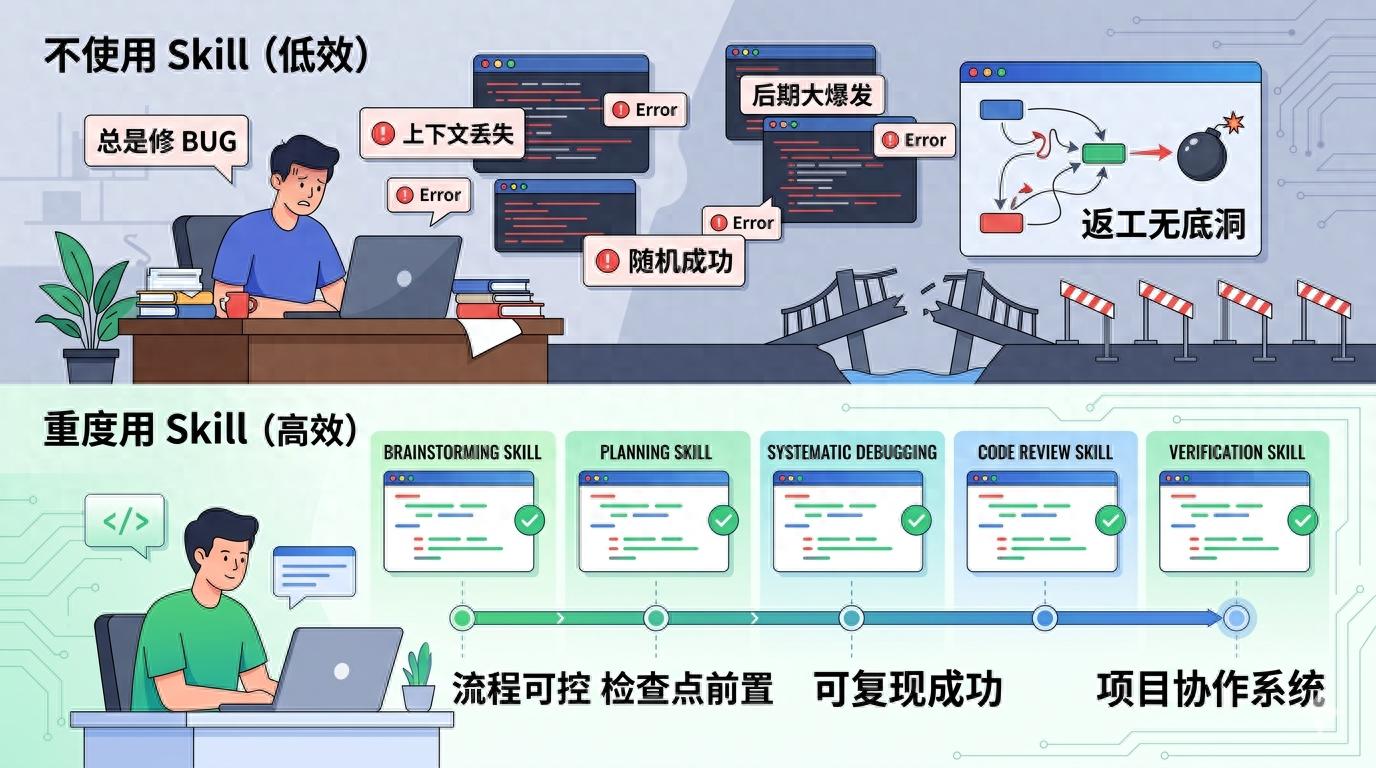
Part One: Without Skills, You Get “Can Write”; With Skills, You Get “Can Execute Projects”
Let’s address a common misconception: many define the goal of vibe coding as “getting AI to write code.” This goal is too low. The real time-consuming aspects are not the initial code version but the subsequent requirement changes, testing, boundary fixes, legacy system integration, and code reviews. Focusing solely on “writing code” will inevitably lead to suffering later.
When skills are not utilized, AI behaves more like a clever but unstable temporary assistant: it can answer, generate, and complete tasks but lacks a unified process constraint. This often results in a chaotic cycle of asking questions, fixing errors as they arise, and drifting context, leading to a firefighting mentality. While this may seem fast in the short term, it becomes fragmented in the long run.
When skills are applied, the change is not merely in “more correct syntax” but in re-framing tasks into executable tracks. For instance, when starting a feature, instead of directly asking AI to write, you first engage in brainstorming skills to clarify goals, boundaries, and acceptance criteria. Then, you use planning skills to break tasks into independent steps. When encountering failures, you switch to systematic debugging instead of just asking the model to “try again.”
The greatest value of this process is transforming “random success” into “reproducible success.” You will notice a significant difference: previously, success depended on good luck or good mood; now, even on a less-than-ideal day, you can follow the process to complete complex tasks. This is the first layer of difference brought by skills: it turns AI from an “output machine” into a “project collaboration system.”
Part Two: Without Skills, Problems Erupt in the Later Stages; With Skills, Issues Are Caught Early
Many people lack statistics on “rework,” leading to a distorted perception. You might feel you’ve made numerous code changes in a day, but if you break down the time, the real value-added time may be less than half, with the other half spent addressing issues buried earlier: inconsistencies in style, unhandled exceptions in interfaces, or uncovered tests, only to discover procedural non-compliance before submission.
Without skills, these issues typically surface in the later stages of the process. When you’re “running fast” without systematic checkpoints, problems tend to emerge all at once during delivery. Many have experienced this: writing feels great, but wrapping up is a nightmare.
With skills, checkpoints are preemptively established. For example, verification-before-completion forces you to validate before declaring completion; requesting-code-review prompts you to seek reviews at critical junctures instead of writing to the end; receiving-code-review helps avoid misinterpretations of review feedback that lead to rework. While it may seem like adding steps, it actually shifts the cost of rework from a “late explosion” to “early minor corrections.”
Personally, I’ve noticed a significant change: I used to spend evenings doing “dirty work,” filling in the holes I dug during the day; now, I often wrap things up in a timely manner, allowing me to truly stop in the evening. You will find that skills do not make you busier; they reduce ineffective labor.
If you’ve ever mentored newcomers in a team, you can relate. Newcomers often work hard but still fall short; once a few key skills are integrated into their routine, their stability improves significantly. It’s not that they suddenly become stronger, but they avoid the common pitfalls that everyone encounters.
Part Three: The Most Overlooked Difference Is Not Speed, but Context Control
The real challenge of vibe coding lies in context management. Collaborating with AI for one hour versus six hours yields entirely different experiences. Over time, changing requirements, historical decisions, and temporary fixes intertwine, and if you’re not careful, context can drift. Many complaints about “AI being unreliable” stem from a loss of context.
Without skills, people typically rely on memory to maintain context: I remember what was said earlier, I should have mentioned this constraint, and the model should know this risk. The problem is that neither the human brain nor the dialogue window is suited for maintaining complex states over the long term. As a result, you may see the model suddenly go off track, and you mistakenly think it has “dumbed down” when, in fact, the context has broken down.
One of the values of skills is transforming “implicit context” into “explicit processes.” For example, in execution planning skills, task boundaries are clarified, steps are tracked, and there is a distinction between completed and incomplete states; in debugging skills, you are required to reproduce, locate, and verify before guessing a fix. The outcome is that even with longer conversations, the system retains a framework and does not rely solely on your on-the-spot memory.
Consider a specific scenario: you’re modifying a heavily legacy module, and halfway through, a new requirement emerges. The common approach without skills is to directly insert the new requirement into the current session, leading to distortion on both sides. The skilled approach is to wrap up the current step first, then decide whether to parallelize sub-tasks or rearrange the plan. You might spend a few extra minutes making decisions, but you save several hours of confusion later.
Many might say, “I have enough experience; I don’t need these processes.” This statement may hold for small tasks, but when tasks cross files, modules, or multiple rounds of reviews, the more experienced you are, the more you recognize the value of processes. Experts do not forgo safeguards; they know when it’s essential to implement them. Skills serve as these safeguards.
Part Four: Who Should Use Skills and When Can You Skip Them
I do not recommend absolutizing skills. Not every task requires a full process. For instance, if you’re just modifying a line of text, fixing a small bug, or replacing a configuration item, doing it directly is often faster. The issue arises when most people misjudge “this task is small” as “I don’t need processes regularly,” leading to pitfalls in tasks of moderate complexity.
I suggest categorizing tasks by complexity:
Level One, Minor Changes. One-time, low-risk, reversible actions can be done lightly without full skills. The focus should be on quick execution without overcomplicating simple tasks.
Level Two, Moderate Functionality. This is the most prone to rework; it’s strongly recommended to fix at least three things: clarify boundaries before starting, track steps during the process, and validate before completion. This level doesn’t require fancy skills; just using the key skills consistently can yield significant benefits.
Level Three, High-Risk Changes. When dealing with core links, multi-person collaboration, historical debt, or deployment pressure, try to connect brainstorming, planning, debugging, reviewing, and verification into a closed loop. You may feel “slower,” but this buys certainty and is highly cost-effective.
Additionally, many people avoid using skills not due to disbelief but because they find it “troublesome.” I suggest starting with one pain point; don’t try to adopt everything at once. For example, if you often struggle at the end stage, start using verification-before-completion; if you rely on guessing for bug fixes, begin with systematic debugging. Start with one, achieve positive feedback, and then expand to two or three.
When you start treating skills as “team habits” rather than “personal techniques,” the benefits become more evident. Not only do they enhance your personal efficiency, but they also reduce communication friction: task statuses become clearer, delivery standards more consistent, and review language more unified. You will notice that discussions shift from “why did you write this incorrectly again” to “should this step be adjusted?” This is the true signal of improved collaborative efficiency.
Conclusion
As vibe coding has evolved, it is no longer about whether AI can write code. The real differentiator is whether you can establish a stable process around it. The difference between using skills and not lies not in the quality of a single output but in your ability to maintain high-quality output consistently over a week or a month.
If you find yourself stuck in the phase of “writing quickly but always reworking,” consider shifting your perspective: focus less on achieving stunning results in a single instance and more on maintaining control over the process. Once you become adept at using skills, AI will no longer just be a code generator; it will become your true collaborative system. At that point, you will clearly feel that efficiency is not a sudden explosion but is built gradually through a set of correct habits.
Comments
Discussion is powered by Giscus (GitHub Discussions). Add
repo,repoID,category, andcategoryIDunder[params.comments.giscus]inhugo.tomlusing the values from the Giscus setup tool.